Zen Cart Logo
Forums / Reports of Security Problems / GoDaddy Proxy error transaction

GoDaddy Proxy error transaction

Views: 161

Results 1 to 13 of 13
28 Jul 2010, 20:31
#1
debishandbag avatar

debishandbag

New Zenner

Join Date:
Jul 2010
Posts:
14
Plugin Contributions:
0

GoDaddy Proxy error transaction

-Im using the newest verson of zencart 1.3.9
-my site has not be upgraded
-i have some modules installed for payments
-its almost the same with the same simple template

IM USING GODADDY FOR MY HOSTING
MY SITE IS DEBISDESIGN.COM

I HAVE SEARCHED THE FAQ AND FORUMS but the issue was never fully resolved for me

this problem started even the time before i had zencart installed. Im sure it has something to do with the hosting problem.


basically whenever someone tries to checkout of my store with Paypal they get an error:
"An error occurred when we tried to contact the payment processor. Please try again, select an alternate payment method, or contact the store owner for assistance. () - (56) Received HTTP code 403 from proxy after CONNECT"

i contacted both paypal and godaddy and both blame eachother for the problem.

i currently know that its a proxy problem that im having with paypal not accepting proxied cURL commands im guessing.

I just need this problem solved please and thanks in advance

28 Jul 2010, 20:37
#2
kim avatar

kim

Obaa-san

Join Date:
Jun 2003
Posts:
26,590
Plugin Contributions:
0

Re: GoDaddy Proxy error transaction

The problem is your hosting. Change hosting.

28 Jul 2010, 20:41
#3
drbyte avatar

drbyte

Sensei

Join Date:
Jan 2004
Posts:
63,513
Plugin Contributions:
177

Re: GoDaddy Proxy error transaction

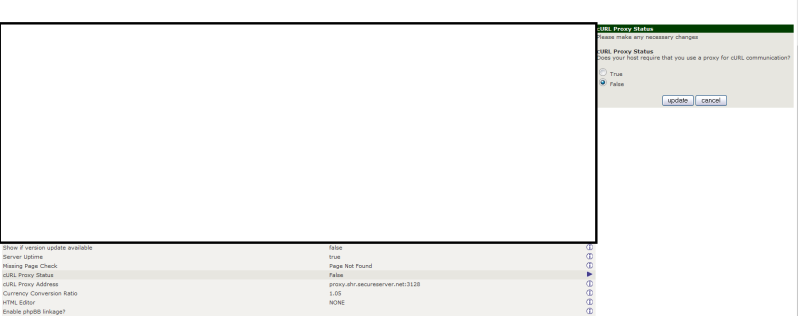
In the meantime, go to Admin->Configuration->My Store->CURL Proxy Status, and turn it off.

28 Jul 2010, 23:39
#4
debishandbag avatar

debishandbag

New Zenner

Join Date:
Jul 2010
Posts:
14
Plugin Contributions:
0

Re: GoDaddy Proxy error transaction

DrByte:

In the meantime, go to Admin->Configuration->My Store->CURL Proxy Status, and turn it off.

Hey Dr. Byte, im sorry but where would i find this?

are you talking about the zencart admin? or the godaddy hosting settings. Please specifiy this because i couldnt find it in godaddy settings

28 Jul 2010, 23:48
#5
debishandbag avatar

debishandbag

New Zenner

Join Date:
Jul 2010
Posts:
14
Plugin Contributions:
0

Re: GoDaddy Proxy error transaction

thank you so much dr. bytes ive found it. I had a quick brain fart. Again thank you for the quick response

29 Jul 2010, 00:34
#6
debishandbag avatar

debishandbag

New Zenner

Join Date:
Jul 2010
Posts:
14
Plugin Contributions:
0

Re: GoDaddy Proxy error transaction

im sorry i keep posting. I thought the problem had been resolved but even after i put False for curl proxy status it was not working. Even when it was set on True the address was proxy.shr.secureserver.net:3128

are you sure im not supposed to edit any sort of ftp files

29 Jul 2010, 02:10
#7
drbyte avatar

drbyte

Sensei

Join Date:
Jan 2004
Posts:
63,513
Plugin Contributions:
177

Re: GoDaddy Proxy error transaction

Setting the proxy status to false should suffice.

Most days I hate GoDaddy Hosting. Today is another one of them.

29 Jul 2010, 08:37
#8
debishandbag avatar

debishandbag

New Zenner

Join Date:
Jul 2010
Posts:
14
Plugin Contributions:
0

Re: GoDaddy Proxy error transaction

alright Dr. Byte thanks alot for your help. One more thing, just check debisdesign.com and try to make a paypal purchase. As you can see the error is still there. And i have done the edit in "my store" under curl proxy address. If there is no other technical help i can receive i will contact godaddy in rage mode.

29 Jul 2010, 16:53
#9
drbyte avatar

drbyte

Sensei

Join Date:
Jan 2004
Posts:
63,513
Plugin Contributions:
177

Re: GoDaddy Proxy error transaction

You're getting:> (56) Received HTTP code 403 from proxy after CONNECT, which tells me you've got the CURL Proxy Status set to True, instead of False.

30 Jul 2010, 04:56
#10
debishandbag avatar

debishandbag

New Zenner

Join Date:
Jul 2010
Posts:
14
Plugin Contributions:
0

Re: GoDaddy Proxy error transaction

DrByte:

You're getting:, which tells me you've got the CURL Proxy Status set to True, instead of False.

Hi Dr. bytes, i actually have had the status on false the whole time and it still gives me the error

that is the proof to show you that im really not crazy. Im just so annoyed how these things always happen to me

BTW: you can also look at my website at Debisdesign.com and try it yourself

30 Jul 2010, 05:22
#11
drbyte avatar

drbyte

Sensei

Join Date:
Jan 2004
Posts:
63,513
Plugin Contributions:
177

Re: GoDaddy Proxy error transaction

I did try it myself. I believe you that it is happening.
Try setting the CURL Proxy Address to blank.
When the proxy-status is set to false, there's no good reason why you should be getting any response back from their proxy system, unless something on your site has altered how the code works, or GoDaddy has altered how they've got your hosting account and/or server set up.

Remember, as Kim said, your best solution is to get a real hosting company. GoDaddy is a dirtball moneygrabbing newb-exploiting scam when it comes to anything other than domain names. And even then they're all about mass-sales and up-sells and ripping you off for every penny they can suck out of you, regardless of the crappy service they give in return.

31 Jul 2010, 05:13
#12
debishandbag avatar

debishandbag

New Zenner

Join Date:
Jul 2010
Posts:
14
Plugin Contributions:
0

Re: GoDaddy Proxy error transaction

im on the phone with them as we speak and he is trying to help me through it while he breathes HEAVILY into the mic. lol

so 2 questions if this fails

what is a good hosting company, and what is the best way to reload all of my websites settings and get it the way it is now onto the new host

thanks in advance

31 Jul 2010, 05:32
#13
debishandbag avatar

debishandbag

New Zenner

Join Date:
Jul 2010
Posts:
14
Plugin Contributions:
0

Re: GoDaddy Proxy error transaction

i have FIXED THE ERROR, and on my own. The guy on the phone was like "aaahhhh you have to disable it" im like really? thanks...

so i went into the ftp folder under includes->modules->payment->paypal->paypal functions.php

changed the (CURL_PROXY_REQUIRED == 'True') { to (CURL_PROXY_REQUIRED == 'False') {

for some reason the administrator part never changed it for me

then under paypal_curl.php i removed the proxy address "proxy.shr.secureserver.net:3128" from the curl_setopt($ch, CURLOPT_PROXY,"");

hopefully i helped some people out with this annoying problem. thanks alot for the support guys