Zen Cart Logo
Forums / Addon Admin Tools / Easy Populate 1.2.5.4 support

Easy Populate 1.2.5.4 support

Views: 1,301,142

Results 1,901 to 1,920 of 3,834
24 Sep 2008, 6:39 AM
#1901
credenscel avatar

credenscel

New Zenner

Join Date:
Aug 2008
Posts:
44
Plugin Contributions:
0

Easy Populate 1.2.5.4 support

Thanks Jeff, i fixed it!
but now after i upload the products i get the below error when i click on the product to edit

Warning: reset() [function.reset]: Passed variable is not an array or object in /home/woh/public_html/zen/admin/includes/classes/object_info.php on line 29

Warning: Variable passed to each() is not an array or object in /home/woh/public_html/zen/admin/includes/classes/object_info.php on line 30

This is what is on line 29 and 30 in that file

 reset($object_array);
  while (list($key, $value) = each($object_array)) 

would you please let me know what is causing this?

24 Sep 2008, 11:02 AM
#1902
ebookba avatar

ebookba

New Zenner

Join Date:
Oct 2007
Posts:
31
Plugin Contributions:
0

Re: Easy Populate 1.2.5.4 support

How to make the mod work for digital download product?
I think some modification would be required to set download location, file type etc

Thanks in advanced

24 Sep 2008, 3:09 PM
#1903
jeff_g avatar

jeff_g

Zen Follower

Join Date:
Oct 2007
Posts:
132
Plugin Contributions:
0

Re: Easy Populate 1.2.5.4 support

reset($object_array);
while (list($key, $value) = each($object_array)) 

Way beyond me. I suggest search the forum for object_array or post in the general questions area.

24 Sep 2008, 3:15 PM
#1904
jeff_g avatar

jeff_g

Zen Follower

Join Date:
Oct 2007
Posts:
132
Plugin Contributions:
0

Re: Easy Populate 1.2.5.4 support

ebookba:

How to make the mod work for digital download product?
I think some modification would be required to set download location, file type etc

I have no experience with digital product, but I have found that if you have moderate programming skills, you could add any fields you need to EP. The core logic is there for updating most files associated with products.

The upload code doesn't begin until pretty far down in the program, but each section has some notes that proved helpfull along with reading the code logic.

Jeff

24 Sep 2008, 3:30 PM
#1905
jeff_g avatar

jeff_g

Zen Follower

Join Date:
Oct 2007
Posts:
132
Plugin Contributions:
0

Re: Easy Populate 1.2.5.4 support

jgg1974:

Can anyone help me with getting rid of all the products I don't want there..
From my experience, if an item is anywhere on the site, it has to be somewhere in the Admin->Products/categories.

24 Sep 2008, 5:09 PM
#1906
jeff_mash avatar

jeff_mash

Totally Zenned

Join Date:
Aug 2004
Posts:
731
Plugin Contributions:
0

Re: Easy Populate 1.2.5.4 support

Great module! Two questions though:

  1. How to I import images hosted on a third party site? In my upload text file, I set the v_products_image to something like: http://www.othersite.com/image.jpg. However, when it imports it into my store, I believe it's saving that long string as the actual image name, so that in my store, it tries to load: http://www.MyStore.com/images/http://www.othersite.com/image.jpg

I use Image Handler 2, by the way. So I would like to know if EP can import the image from this other site and save it directory into my Images folder, stripping off the URL and only storing the image name in the database so that Image Handler can pick it up?

  1. How can I modify the EP php file so that it won't import a product if the v_products_model value matches ANY PART of an existing record? For example, let's say that I have an existing record called "ITEM123 - A" and in my import file, I have a new item called "ITEM123". I do not want to import this new record. Where can I edit in the EP php file to see if any part of the string matches, to simply skip it and don't import it?
24 Sep 2008, 5:30 PM
#1907
credenscel avatar

credenscel

New Zenner

Join Date:
Aug 2008
Posts:
44
Plugin Contributions:
0

Re: Easy Populate 1.2.5.4 support

[QUOTE=Jeff G;616661]```php
reset($object_array);
while (list($key, $value) = each($object_array))


Well Line 28 had // in front of       if (!is_array($object_array)) return;
i deleted the // and i am not getting the errors - however, when i click to edit the product all of the feilds are BLANK, even though i see the products listed on the front page.. :eek: 
everything goes back to normal when i change the product id back to 1.

not sure how to fix it, i'll keep looking. i'm thinking i might just use product id 1 as a workaround then run the sql patch to update things to music product.

Would anyone please let me know what the appropriate "v_products..." would be for "record company" and "music genre" so i can add these 2 fields to the EP file?
24 Sep 2008, 6:24 PM
#1908
jeff_mash avatar

jeff_mash

Totally Zenned

Join Date:
Aug 2004
Posts:
731
Plugin Contributions:
0

Re: Easy Populate 1.2.5.4 support

For the record, I was able to address this issue:

  1. How can I modify the EP php file so that it won't import a product if the v_products_model value matches ANY PART of an existing record? For example, let's say that I have an existing record called "ITEM123 - A" and in my import file, I have a new item called "ITEM123". I do not want to import this new record. Where can I edit in the EP php file to see if any part of the string matches, to simply skip it and don't import it?

The way I did that was to do the following:

  1. Line 1877 - CHANGE:
    $result = ep_query("SELECT products_id FROM ".TABLE_PRODUCTS." WHERE (products_model = '" . zen_db_input($v_products_model) . "')");

TO THIS:
$result = ep_query("SELECT products_id FROM ".TABLE_PRODUCTS." WHERE (products_model LIKE '%" . zen_db_input($v_products_model) . "%')");

Then I commented out Line 1941 to Line 1978, which is the block of code that updates existing orders. The reason I have this need is because I am not planning to update anything, but rather, ADD new items only.

I still need some help with this one outstanding issue though:

Jeff_Mash:

  1. How to I import images hosted on a third party site? In my upload text file, I set the v_products_image to something like: http://www.othersite.com/image.jpg. However, when it imports it into my store, I believe it's saving that long string as the actual image name, so that in my store, it tries to load: http://www.MyStore.com/images/http://www.othersite.com/image.jpg

I use Image Handler 2, by the way. So I would like to know if EP can import the image from this other site and save it directory into my Images folder, stripping off the URL and only storing the image name in the database so that Image Handler can pick it up?

25 Sep 2008, 12:55 AM
#1909
truliebliss avatar

truliebliss

New Zenner

Join Date:
Sep 2008
Posts:
41
Plugin Contributions:
1

Re: Easy Populate 1.2.5.4 support

Jeff G:

It does work with 1.38. You can find it in the downloads section.
I have looked in the download section but cant find owt that says Easy Populate??

25 Sep 2008, 1:16 AM
#1910
truliebliss avatar

truliebliss

New Zenner

Join Date:
Sep 2008
Posts:
41
Plugin Contributions:
1

Re: Easy Populate 1.2.5.4 support

ok think i found the right 1 but when i upload my products it comes up with this error::
Warning: move_uploaded_file(/home/truliebl/public_html/temp/export_attributes_20080920.xls) [function.move-uploaded-file]: failed to open stream: Permission denied in /home/truliebl/public_html/admin/includes/functions/extra_functions/easypopulate_functions.php on line 57

Warning: move_uploaded_file() [function.move-uploaded-file]: Unable to move '/tmp/phpnL3RVf' to '/home/truliebl/public_html/temp/export_attributes_20080920.xls' in /home/truliebl/public_html/admin/includes/functions/extra_functions/easypopulate_functions.php on line 57

Warning: file(/home/truliebl/public_html/temp/export_attributes_20080920.xls) [function.file]: failed to open stream: No such file or directory in /home/truliebl/public_html/admin/easypopulate.php on line 1201

Warning: Invalid argument supplied for foreach() in /home/truliebl/public_html/admin/easypopulate.php on line 1301

Help any1?:no:

25 Sep 2008, 2:24 AM
#1911
jeff_g avatar

jeff_g

Zen Follower

Join Date:
Oct 2007
Posts:
132
Plugin Contributions:
0

Re: Easy Populate 1.2.5.4 support

credenscel,

From your post it sounds like you changed the default of products_id, not products_type. Products_id should not be in the EP file. It is either found by EP when updating, or assigned automatically for new product.
Give that a check.

Jeff

25 Sep 2008, 2:28 AM
#1912
jeff_g avatar

jeff_g

Zen Follower

Join Date:
Oct 2007
Posts:
132
Plugin Contributions:
0

Re: Easy Populate 1.2.5.4 support

TrulieBliss:

I have looked in the download section but cant find owt that says Easy Populate??

At top of this page click "free software add ons". Then search for "easy populate free from langer". DO NOT use the one from OSC.

I just saw your new post after writing this. It sounds like you might have missed a step. You must create the "temp" folder at the root of your store (same level as admin/includes/images/etc.)
Jeff

25 Sep 2008, 2:39 AM
#1913
jeff_g avatar

jeff_g

Zen Follower

Join Date:
Oct 2007
Posts:
132
Plugin Contributions:
0

Re: Easy Populate 1.2.5.4 support

Jeff_Mash:

For the record, I was able to address this issue:
I still need some help with this one outstanding issue though:

I think you have the right solution for issue 2. One thing though, I don't know sql that well, but based on you solution I assume % is a wild card. If thats the case, wouldn't you just want it on the end?

For issue 1: ZC does not support images that are not local to the site, so this will not work. If you only want images on the product info page, and don't care about listing/featured/special/etc, you can add an <a href=...> to your product description.

Jeff

25 Sep 2008, 2:45 AM
#1914
jeff_g avatar

jeff_g

Zen Follower

Join Date:
Oct 2007
Posts:
132
Plugin Contributions:
0

Re: Easy Populate 1.2.5.4 support

On the image link issue,

Several (at least you and one other :D) people have asked about doing this. If someone is pretty good at php, it would probably not be too difficult to write a program that reads a list of image URLs and copies them to your local drive or image folder.

Might be some legal issues there though.

Just a thought.

Jeff

25 Sep 2008, 4:01 AM
#1915
jeff_mash avatar

jeff_mash

Totally Zenned

Join Date:
Aug 2004
Posts:
731
Plugin Contributions:
0

Re: Easy Populate 1.2.5.4 support

Thanks for the comments. As for the image thing, this was addressed before right here: http://www.zen-cart.com/forum/showthread.php?p=514583&highlight=Products+Image#post514583

So what I have done is contacted the company from which I am importing their products, and they are going to send me a DVD with all their images on it. That way, I can simply upload them all to my images directory, and then run the EP program on there to insert all the items.

Thanks again for the help!

25 Sep 2008, 4:19 AM
#1916
misty avatar

misty

Inactive

Join Date:
Apr 2004
Location:
UK
Posts:
5,752
Plugin Contributions:
1

Re: Easy Populate 1.2.5.4 support

Jeff G:

At top of this page click "free software add ons". Then search for "easy populate free from langer". DO NOT use the one from OSC.
Jeff
Or download Langer's release version 1.2.5.4 from his site at
http://modhole.com/modhole/index.php?module=documents&JAS_DocumentManager_op=viewDocument&JAS_Document_id=2&4a518f10f450e0719f940c2fab0a7c46=43df39a8dc8b460c8b11034d58f7ea8d

25 Sep 2008, 4:47 PM
#1917
credenscel avatar

credenscel

New Zenner

Join Date:
Aug 2008
Posts:
44
Plugin Contributions:
0

Re: Easy Populate 1.2.5.4 support

Jeff G:

credenscel,

From your post it sounds like you changed the default of products_id, not products_type. Products_id should not be in the EP file. It is either found by EP when updating, or assigned automatically for new product.
Give that a check.

Jeff

Jeff,
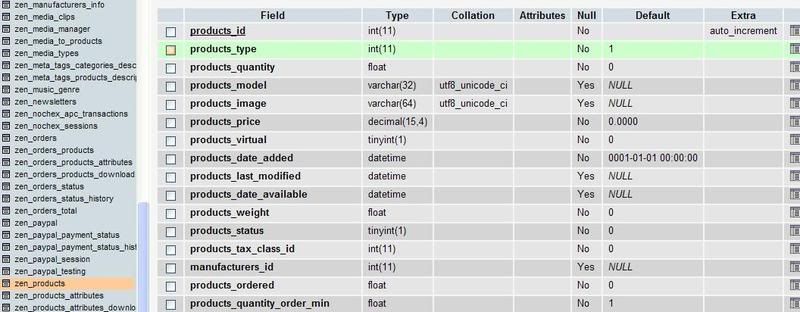
Below is the image showing what i am changing am i doing it wrong? please let me know

25 Sep 2008, 5:38 PM
#1918
jeff_g avatar

jeff_g

Zen Follower

Join Date:
Oct 2007
Posts:
132
Plugin Contributions:
0

Re: Easy Populate 1.2.5.4 support

I don't see any changes in the image. The second line reads "products_type" with a default of "1". Change the default to "2".

Also, I think I mentioned this before - there are several files for music that make using the music type meaningful. Unless you mod EP to update those files, I don't think you gain anything by changing to type music.

25 Sep 2008, 7:47 PM
#1919
credenscel avatar

credenscel

New Zenner

Join Date:
Aug 2008
Posts:
44
Plugin Contributions:
0

Re: Easy Populate 1.2.5.4 support

yes, i am setting it to ID 2. It doesnt work. :cry:

At this point i dont know how else i can tweak this. If anyone can help figure out a solution for EP to work for music products please let me know i'm willing to pay for your efforts.

25 Sep 2008, 8:56 PM
#1920
jeff_g avatar

jeff_g

Zen Follower

Join Date:
Oct 2007
Posts:
132
Plugin Contributions:
0

Re: Easy Populate 1.2.5.4 support

In software work, language is very important.
You refer to "ID 2". Is that what you are doing? Or did you mean something else?
We never discussed ID. You should not be doing anything with ID.