Zen Cart Logo
Forums / All Other Contributions/Addons / Image Handler 2 (for ZC v1.3.8 ONLY) Support

Image Handler 2 (for ZC v1.3.8 ONLY) Support

Views: 2,510,731

Results 3,741 to 3,760 of 7,094
10 Apr 2009, 12:02 PM
#3741
berserker avatar

berserker

Totally Zenned

Join Date:
May 2006
Posts:
712
Plugin Contributions:
0

Image Handler 2 (for ZC v1.3.8 ONLY) Support

Dimensions of original images varies from image to image and then I use Photoshop to crop the images to 160 by 175. This is what I upload to the site. Regarding larger images, I will upload them separately. All original images are BMP.

10 Apr 2009, 12:15 PM
#3742
limelites avatar

limelites

Totally Zenned

Join Date:
Jan 2009
Posts:
2,085
Plugin Contributions:
0

Re: Image Handler 2 (for ZC v1.3.8 ONLY) Support

Berserker:

Dimensions of original images varies from image to image and then I use Photoshop to crop the images to 160 by 175. This is what I upload to the site. Regarding larger images, I will upload them separately. All original images are BMP.

If you are happy with a slight file size increase then try Photoshop's save for web and devices, choose PNG24 as the file type and you'll see a much crisper image only a little bigger than your .jpg compressed images.

10 Apr 2009, 12:17 PM
#3743
berserker avatar

berserker

Totally Zenned

Join Date:
May 2006
Posts:
712
Plugin Contributions:
0

Re: Image Handler 2 (for ZC v1.3.8 ONLY) Support

Will try that. Thank you

10 Apr 2009, 1:27 PM
#3744
ckosloff avatar

ckosloff

Totally Zenned

Join Date:
Feb 2007
Location:
South Florida, USA
Posts:
1,375
Plugin Contributions:
0

Re: Image Handler 2 (for ZC v1.3.8 ONLY) Support

need_help:

...Check a few posts up and you will see a revised version that fixes issues with the medium zoom...
Would you be so kind as to post the exact post number, please?
Have searched posts up, and used the search function too and haven't been able to come up with anything.

10 Apr 2009, 3:36 PM
#3745
tophand avatar

tophand

Totally Zenned

Join Date:
Jan 2007
Location:
1.5 miles from Home
Posts:
674
Plugin Contributions:
0

Re: Image Handler 2 (for ZC v1.3.8 ONLY) Support

limelites:

If you are happy with a slight file size increase then try Photoshop's save for web and devices, choose PNG24 as the file type and you'll see a much crisper image only a little bigger than your .jpg compressed images.

Berserker:

Will try that. Thank you

Have you tried this?
http://www.zen-cart.com/forum/showpost.php?p=713433&postcount=3753

IH has the tools to change the file format on the fly.
Saves you time from changing all your images using Photoshop.

You can as a option upload your bmp files and IH can convert them to gif, jpeg or png on the fly.
You can right now (takes about 5 secs) make it so only the small image convert to png format using the images you already uploaded.

As noted, IH can not improve poor looking images.

11 Apr 2009, 5:42 AM
#3747
tophand avatar

tophand

Totally Zenned

Join Date:
Jan 2007
Location:
1.5 miles from Home
Posts:
674
Plugin Contributions:
0

Re: Image Handler 2 (for ZC v1.3.8 ONLY) Support

ckosloff:

Tophand,
Sorry to be a pest.
Is this:
http://www.zen-cart.com/forum/showpost.php?p=517658&postcount=2340
the latest version of jscript_imagehover.js?
Thanks.

As far I know, it is.

11 Apr 2009, 2:36 PM
#3748
need_help avatar

need_help

Zen Follower

Join Date:
Feb 2009
Posts:
205
Plugin Contributions:
0

Re: Image Handler 2 (for ZC v1.3.8 ONLY) Support

Berserker:

Dimensions of original images varies from image to image and then I use Photoshop to crop the images to 160 by 175. This is what I upload to the site. Regarding larger images, I will upload them separately. All original images are BMP.

That just won't work right.

It's best you use only your large images in Photoshop then upload to your images folder and Image Handler 2 will do the rest and make Medium and Small images from your large sized pictures.

11 Apr 2009, 2:38 PM
#3749
need_help avatar

need_help

Zen Follower

Join Date:
Feb 2009
Posts:
205
Plugin Contributions:
0

Re: Image Handler 2 (for ZC v1.3.8 ONLY) Support

ckosloff:

Tophand,
Sorry to be a pest.
Is this:
http://www.zen-cart.com/forum/showpost.php?p=517658&postcount=2340
the latest version of jscript_imagehover.js?
Thanks.

Thats the one i used which fixed an error in Internet Explorer 8 and i now get medium images zooming to large.

12 Apr 2009, 7:59 AM
#3750
vaige avatar

vaige

New Zenner

Join Date:
Mar 2009
Posts:
43
Plugin Contributions:
0

Re: Image Handler 2 (for ZC v1.3.8 ONLY) Support

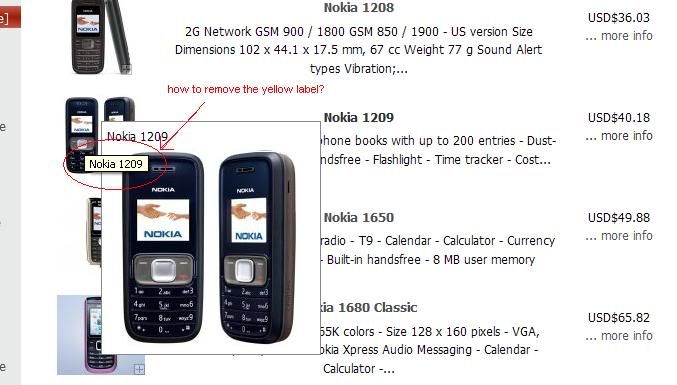
anyone can help to remove the yellow label? when i hover the mouse over the image.. thank you!

12 Apr 2009, 3:49 PM
#3751
ckosloff avatar

ckosloff

Totally Zenned

Join Date:
Feb 2007
Location:
South Florida, USA
Posts:
1,375
Plugin Contributions:
0

Re: Image Handler 2 (for ZC v1.3.8 ONLY) Support

vaige:

anyone can help to remove the yellow label? when i hover the mouse over the image.. thank you!
I think that this "yellow label" is caused by an alt tag originally included in the image.
Nothing wrong with it, it will help you with search engines and vision-impaired people.
I would just leave it there, but you can delete image, remove alt tag in original image and reupload.

13 Apr 2009, 9:37 AM
#3752
vaige avatar

vaige

New Zenner

Join Date:
Mar 2009
Posts:
43
Plugin Contributions:
0

Re: Image Handler 2 (for ZC v1.3.8 ONLY) Support

Thank you for your reply!

13 Apr 2009, 7:26 PM
#3753
gofer_p avatar

gofer_p

New Zenner

Join Date:
Oct 2008
Posts:
32
Plugin Contributions:
0

Re: Image Handler 2 (for ZC v1.3.8 ONLY) Support

I am unable to get the watermark to work on my main product images.It works on all the additional images.

see example here

I have tried but no success.Can anyone help

14 Apr 2009, 1:06 PM
#3754
poosk avatar

poosk

Totally Zenned

Join Date:
Mar 2005
Location:
Helsinki
Posts:
477
Plugin Contributions:
0

Re: Image Handler 2 (for ZC v1.3.8 ONLY) Support

poosk:

Hey has anyone found a way to make image handler compatible with the swap image plugin?? Many thanks!

is there a yes or no? anyone?

14 Apr 2009, 1:14 PM
#3755
limelites avatar

limelites

Totally Zenned

Join Date:
Jan 2009
Posts:
2,085
Plugin Contributions:
0

Re: Image Handler 2 (for ZC v1.3.8 ONLY) Support

poosk:

is there a yes or no? anyone?

I don't think you could get those two working together easily. Image Swap requires the traditional ZC folder structure to function... That is to say:

images/SUB/image.1.jpg
images/medium/SUB/image.1_MED.jpg
images/large/SUB/image.1_LRG.jpg

IH only needs one set of images in the images/SUB folder. However, if you were to upload a full set of ZC structured images then you could get them both working together. Which sort of defeats the purpose of IH?!

14 Apr 2009, 1:25 PM
#3756
mw4kids avatar

mw4kids

Zen Follower

Join Date:
Oct 2008
Posts:
403
Plugin Contributions:
0

Re: Image Handler 2 (for ZC v1.3.8 ONLY) Support

Hi All,

Can someone help me out here...I wanted to try to adjust some of the sizes of my pictures through the image handler manager and it want let me access that area. When I click on a product (click on 'i') it takes me to the IH area but only shows the Categories in the drop down menu and states 'product is disabled'. I use to be able to access this page, not sure what happened. Any ideas?

Also, I think IH is great, but wondering is someone can give me some feedback. Since using the program, my images on my Product Listing page are small and not very clear as before and not sure how to get it back to that while at the same time keeping my site optimized. i've seen other sites doing the same as myself and there pictures are much larger, clearer and the same size and they don't seem to have an issue with web speed. Any ideas what I can do?

Thanks!!!

14 Apr 2009, 3:38 PM
#3757
need_help avatar

need_help

Zen Follower

Join Date:
Feb 2009
Posts:
205
Plugin Contributions:
0

Re: Image Handler 2 (for ZC v1.3.8 ONLY) Support

mw4kids:

Hi All,

Can someone help me out here...I wanted to try to adjust some of the sizes of my pictures through the image handler manager and it want let me access that area. When I click on a product (click on 'i') it takes me to the IH area but only shows the Categories in the drop down menu and states 'product is disabled'. I use to be able to access this page, not sure what happened. Any ideas?

Also, I think IH is great, but wondering is someone can give me some feedback. Since using the program, my images on my Product Listing page are small and not very clear as before and not sure how to get it back to that while at the same time keeping my site optimized. i've seen other sites doing the same as myself and there pictures are much larger, clearer and the same size and they don't seem to have an issue with web speed. Any ideas what I can do?

Thanks!!!

It always shows that.

You have to click the arrow and then pick the category and then pick an item but that area does not control the size or quality of the image.

Go to configuration and images and control the size and quality of the images from within there.

Remember though that the quality can also be determined by the quality and size of the picture you upload and you should always upload a large size and let Image Handler make the medium and small sizes for you.

14 Apr 2009, 5:46 PM
#3758
mw4kids avatar

mw4kids

Zen Follower

Join Date:
Oct 2008
Posts:
403
Plugin Contributions:
0

Re: Image Handler 2 (for ZC v1.3.8 ONLY) Support

need_help:

It always shows that.

You have to click the arrow and then pick the category and then pick an item but that area does not control the size or quality of the image.

Go to configuration and images and control the size and quality of the images from within there.

Remember though that the quality can also be determined by the quality and size of the picture you upload and you should always upload a large size and let Image Handler make the medium and small sizes for you.

Well that definitely would make sense about how I may be taking pictures. As of now, I have my camera set to take pics at 640x480px cause since I have over 1000 images on my site I was worried taking pics larger than that would slow it down. But I guess that's the point of IH :blush: didn't consider that...

As for the first part, when I click on Manager>Category it takes me automatically to Admin (of IH)..where as before as you stated it would take me to my product images. I don't know if somehow I acquired a bug or I made a change under my Admin that somehow affected this. By the way, when I go under the IH Manager is states 'Linked Product 1005' (not sure if that has anything to do with it).

thanks for your help!

14 Apr 2009, 6:33 PM
#3759
need_help avatar

need_help

Zen Follower

Join Date:
Feb 2009
Posts:
205
Plugin Contributions:
0

Re: Image Handler 2 (for ZC v1.3.8 ONLY) Support

mw4kids:

Well that definitely would make sense about how I may be taking pictures. As of now, I have my camera set to take pics at 640x480px cause since I have over 1000 images on my site I was worried taking pics larger than that would slow it down. But I guess that's the point of IH :blush: didn't consider that...

As for the first part, when I click on Manager>Category it takes me automatically to Admin (of IH)..where as before as you stated it would take me to my product images. I don't know if somehow I acquired a bug or I made a change under my Admin that somehow affected this. By the way, when I go under the IH Manager is states 'Linked Product 1005' (not sure if that has anything to do with it).

thanks for your help!

No a linked product just means it's a product in two different categories so that won't affect you at all.

You can actually uninstall and install Image Handler using the admin/ tools and image handler so if there was a bug that should fix it unless it's a bug in the actual files. It takes five seconds to uninstall and five seconds to install again.

You can just click manager which is next to admin though and that should work.

Do some tests at different resolutions with your camera and see which works best and then use that resolution.

14 Apr 2009, 6:46 PM
#3760
mw4kids avatar

mw4kids

Zen Follower

Join Date:
Oct 2008
Posts:
403
Plugin Contributions:
0

Re: Image Handler 2 (for ZC v1.3.8 ONLY) Support

thanks for the suggestions! will give them a try...