Zen Cart Logo
Forums / All Other Contributions/Addons / Image Handler 2 (for ZC v1.3.8 ONLY) Support

Image Handler 2 (for ZC v1.3.8 ONLY) Support

Views: 2,510,642

Results 4,621 to 4,640 of 7,094
2 Jan 2010, 7:51 PM
#4621
ckosloff avatar

ckosloff

Totally Zenned

Join Date:
Feb 2007
Location:
South Florida, USA
Posts:
1,375
Plugin Contributions:
0

Image Handler 2 (for ZC v1.3.8 ONLY) Support

I just tested IH2 on PHP 5.3 and 5.3.1 and it works great.

3 Jan 2010, 1:48 AM
#4622
divavocals avatar

divavocals

Totally Zenned

Join Date:
Jan 2007
Location:
Los Angeles, California, United States
Posts:
10,011
Plugin Contributions:
3

Re: Image Handler 2 (for ZC v1.3.8 ONLY) Support

bmccune:

**Note: DO NOT USE AUTHOR version of IH2 look for and use ver 7 of IH2 (found in the DL section here Zen Cart™ Version: v1.3.8 Version: Ver 2.0 rev 7, **In general you should ALWAYS check the download section for the latest versions of MOST modules BEFORE you go to the authors website.. It's not written here because it's one of the things you "learn" or "figure out" after you've been here a bit.. Now there are SOME modules where the version on the author's website is the most up to date version..

In the case of IH2, the original author is LONG gone, and so I won't be downloading ANYTHING from his site.. I personally always check BOTH the author's website (if it exists) to make SURE I have the latest version.. I also make a habit of reading through the support threads for the modules I use so I can have a FULL sense of where the modules stands before I download and install..

Hope that helps others..

4 Jan 2010, 11:36 AM
#4623
timkroeger avatar

timkroeger

Totally Zenned

Join Date:
Feb 2005
Location:
Germany
Posts:
580
Plugin Contributions:
0

Re: Image Handler 2 (for ZC v1.3.8 ONLY) Support

There was already a link to the zen-cart download section on the front page of breakmyzencart. I've added an additional note to http://breakmyzencart.com/image-handler/ so people who read at least the first few lines on the page should know where to look for up to date versions. The site will still continue to exist, but I think the info is prominent enough.

Cheers
Tim

4 Jan 2010, 2:38 PM
#4624
divavocals avatar

divavocals

Totally Zenned

Join Date:
Jan 2007
Location:
Los Angeles, California, United States
Posts:
10,011
Plugin Contributions:
3

Re: Image Handler 2 (for ZC v1.3.8 ONLY) Support

timkroeger:

There was already a link to the zen-cart download section on the front page of breakmyzencart. I've added an additional note to http://breakmyzencart.com/image-handler/ so people who read at least the first few lines on the page should know where to look for up to date versions. The site will still continue to exist,** but I think the info is prominent enough.**

Cheers
Tim I think the very first blog post on your site covers it..:smile:

Most up to date versions of image handler modified for current releases of zen-cart can be found in the zen-cart.com download section. As I have no time to take care of this project, the zen-cart community has continued to support and keep image handler up to date. This page will still continue to exist though.

4 Jan 2010, 3:41 PM
#4625
blessisaacola avatar

blessisaacola

Totally Zenned

Join Date:
Feb 2004
Location:
Georgia, USA
Posts:
1,875
Plugin Contributions:
1

Re: Image Handler 2 (for ZC v1.3.8 ONLY) Support

timkroeger:

There was already a link to the zen-cart download section on the front page of breakmyzencart. I've added an additional note to http://breakmyzencart.com/image-handler/ so people who read at least the first few lines on the page should know where to look for up to date versions. The site will still continue to exist, but I think the info is prominent enough.

Cheers
Tim

Tim, I was delighted to read your post. It's been a very long time. Hope life is treating you well. Best wishes!

4 Jan 2010, 4:25 PM
#4626
kburner avatar

kburner

Totally Zenned

Join Date:
Apr 2008
Location:
Flint, Michigan
Posts:
684
Plugin Contributions:
0

Re: Image Handler 2 (for ZC v1.3.8 ONLY) Support

DivaVocals:

What you want is not part of IH2's features. You would need to have this custom coded for you..

I looked around forum for answer to this and keep getting re-directed back to this mod. I have Image Handler loaded. It works great. When I load one image and gives me larger one for product pages. On main page, it gives image with title as you hover over image. I would like the image/picture of the hover to stop. You can see it on my main page at https://www.burnerbooks.com. You have to go down to Specials and new products.

Will deleting stylesheet_image_hover and jscript_imagehover.js stop hover effect over main page images?

4 Jan 2010, 5:37 PM
#4627
divavocals avatar

divavocals

Totally Zenned

Join Date:
Jan 2007
Location:
Los Angeles, California, United States
Posts:
10,011
Plugin Contributions:
3

Re: Image Handler 2 (for ZC v1.3.8 ONLY) Support

kburner:

I looked around forum for answer to this and keep getting re-directed back to this mod. I have Image Handler loaded. It works great. When I load one image and gives me larger one for product pages. On main page, it gives image with title as you hover over image. I would like the image/picture of the hover to stop. You can see it on my main page at www.burnerbooks.com. You have to go down to Specials and new products.

Will deleting stylesheet_image_hover and jscript_imagehover.js stop hover effect over main page images?You can turn off the hover effect from the admin..

4 Jan 2010, 6:01 PM
#4628
mipavluk avatar

mipavluk

Zen Follower

Join Date:
Jun 2007
Location:
Posadas, Misiones, Argentina
Posts:
221
Plugin Contributions:
0

Re: Image Handler 2 (for ZC v1.3.8 ONLY) Support

Hi there

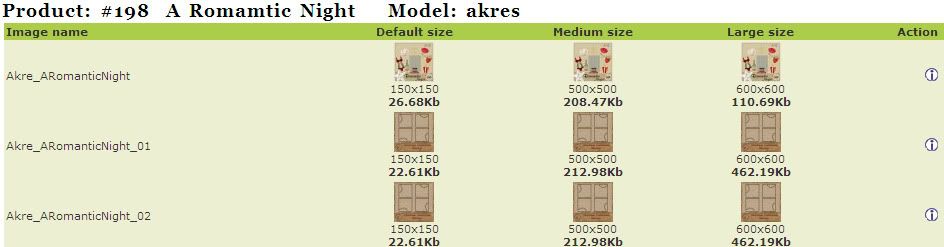
I'm having a problem with my additional images.

I have zen 1.3.8a and the last version of IH2.

Take a look on this page:

http://www.scrapparty-digishop.com/index.php?main_page=product_info&cPath=17_18&products_id=198

main image called: Akre_ARomanticNight.jpg

additionals called: Akre_ARomanticNight_01.jpg

and Akre_ARomanticNight_02.jpg

in my admin area... everything looks ok...

sorry if this problem was solved before... I just spend 8 hours searching and reading... and when I found a people with my same problem... the person don't post again... or just don't get a reply.... and like my main language is not english... I have a bit loss at this point...

thanks in advance...

4 Jan 2010, 8:14 PM
#4629
kburner avatar

kburner

Totally Zenned

Join Date:
Apr 2008
Location:
Flint, Michigan
Posts:
684
Plugin Contributions:
0

Re: Image Handler 2 (for ZC v1.3.8 ONLY) Support

DivaVocals:

You can turn off the hover effect from the admin..

Where? I looked thru admin/config/images...could not find anything with hover.

4 Jan 2010, 8:39 PM
#4630
mipavluk avatar

mipavluk

Zen Follower

Join Date:
Jun 2007
Location:
Posadas, Misiones, Argentina
Posts:
221
Plugin Contributions:
0

Re: Image Handler 2 (for ZC v1.3.8 ONLY) Support

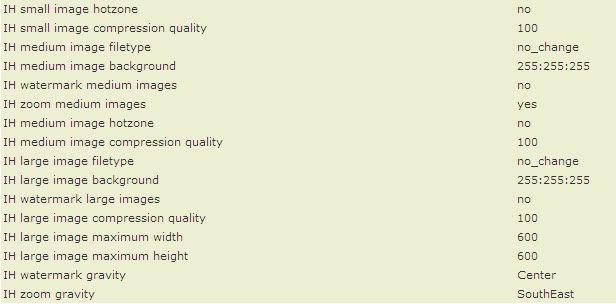
Configuration/Images

IH zoom small images turn to no

IH zoom medium images turn to no

4 Jan 2010, 9:38 PM
#4631
divavocals avatar

divavocals

Totally Zenned

Join Date:
Jan 2007
Location:
Los Angeles, California, United States
Posts:
10,011
Plugin Contributions:
3

Re: Image Handler 2 (for ZC v1.3.8 ONLY) Support

mipavluk:

Configuration/Images

IH zoom small images turn to no

IH zoom medium images turn to noYeah.. what he/she said..

4 Jan 2010, 11:30 PM
#4632
kburner avatar

kburner

Totally Zenned

Join Date:
Apr 2008
Location:
Flint, Michigan
Posts:
684
Plugin Contributions:
0

Re: Image Handler 2 (for ZC v1.3.8 ONLY) Support

mipavluk:

Configuration/Images

IH zoom small images turn to no

IH zoom medium images turn to no

Thank you!!!:clap:

5 Jan 2010, 5:12 AM
#4633
feanix02 avatar

feanix02

New Zenner

Join Date:
Dec 2008
Posts:
14
Plugin Contributions:
0

Re: Image Handler 2 (for ZC v1.3.8 ONLY) Support

Hello,

I have installed this contribution and its working great so far! However I’ve run into something and can't quite figure it out.

In my images folder all my images are named correctly, example my-product-picture.jpg. When I check my temp files or save as the image it turns into something like

6a8fe7b55586b5269648555282c63a57_image_120x120.jpg

Is this normal? I'd prefer to have my images read as my product names.

I have searched around for quite some time and can't find any info on this, either that or I’m missing it.

Thank you in advance!

5 Jan 2010, 1:51 PM
#4634
divavocals avatar

divavocals

Totally Zenned

Join Date:
Jan 2007
Location:
Los Angeles, California, United States
Posts:
10,011
Plugin Contributions:
3

Re: Image Handler 2 (for ZC v1.3.8 ONLY) Support

feanix02:

Hello,

I have installed this contribution and its working great so far! However I’ve run into something and can't quite figure it out.

In my images folder all my images are named correctly, example my-product-picture.jpg. When I check my temp files or save as the image it turns into something like

6a8fe7b55586b5269648555282c63a57_image_120x120.jpg

Is this normal? I'd prefer to have my images read as my product names.

I have searched around for quite some time and can't find any info on this, either that or I’m missing it.

Thank you in advance!Normal behavior..

5 Jan 2010, 6:45 PM
#4635
mipavluk avatar

mipavluk

Zen Follower

Join Date:
Jun 2007
Location:
Posadas, Misiones, Argentina
Posts:
221
Plugin Contributions:
0

Re: Image Handler 2 (for ZC v1.3.8 ONLY) Support

(please... help...)

Hi there

I'm having a problem with my additional images.

I have zen 1.3.8a and the last version of IH2.

Take a look on this page:

http://www.scrapparty-digishop.com/i...roducts_id=198

main image called: Akre_ARomanticNight.jpg

additionals called: Akre_ARomanticNight_01.jpg

and Akre_ARomanticNight_02.jpg

in my admin area... everything looks ok...

sorry if this problem was solved before... I just spend 8 hours searching and reading... and when I found a people with my same problem... the person don't post again... or just don't get a reply.... and like my main language is not english... I have a bit loss at this point...

thanks in advance...

5 Jan 2010, 7:23 PM
#4636
ckosloff avatar

ckosloff

Totally Zenned

Join Date:
Feb 2007
Location:
South Florida, USA
Posts:
1,375
Plugin Contributions:
0

Re: Image Handler 2 (for ZC v1.3.8 ONLY) Support

mipavluk:

http://www.scrapparty-digishop.com/i...roducts_id=198
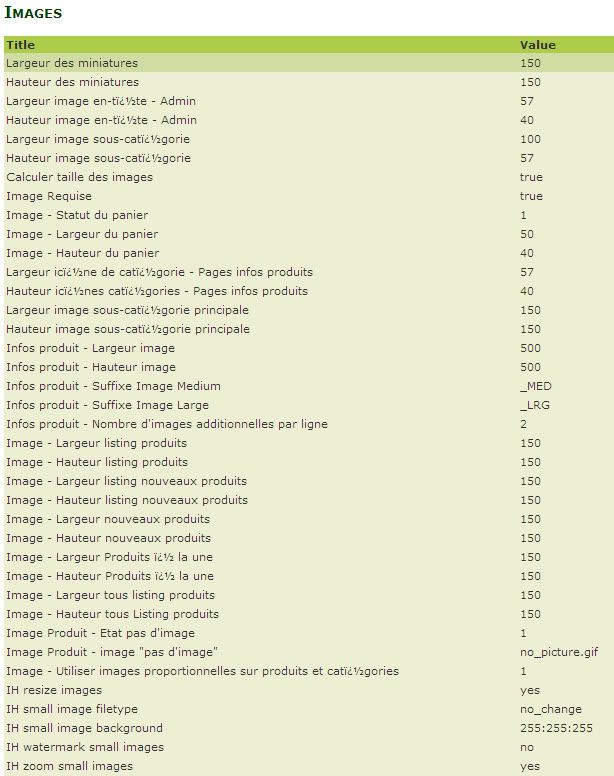
Your main image is too big, there is no difference between it and what shows when "click to enlarge".
The naming convention is fine, and if this shows OK in the IH2 admin then you are OK there.
I assume that you are uploading your additionals via IH2, right?
Please post your Admin -> Images page, I suspect the problem is there.
Don't worry, DivaVocals will have you up in no time. :smile:

5 Jan 2010, 8:00 PM
#4637
mipavluk avatar

mipavluk

Zen Follower

Join Date:
Jun 2007
Location:
Posadas, Misiones, Argentina
Posts:
221
Plugin Contributions:
0

Re: Image Handler 2 (for ZC v1.3.8 ONLY) Support

yes... I know... my main image is 500x500
and when enlarge is 600x600

I try both things... uploading via IH2.

And uploading via FTP... and the same... no success...

thanks in advance....

ckosloff:

Your main image is too big, there is no difference between it and what shows when "click to enlarge".
The naming convention is fine, and if this shows OK in the IH2 admin then you are OK there.
I assume that you are uploading your additionals via IH2, right?
Please post your Admin -> Images page, I suspect the problem is there.
Don't worry, DivaVocals will have you up in no time. :smile:

5 Jan 2010, 10:43 PM
#4638
divavocals avatar

divavocals

Totally Zenned

Join Date:
Jan 2007
Location:
Los Angeles, California, United States
Posts:
10,011
Plugin Contributions:
3

Re: Image Handler 2 (for ZC v1.3.8 ONLY) Support

ckosloff:

Your main image is too big, there is no difference between it and what shows when "click to enlarge".
The naming convention is fine, and if this shows OK in the IH2 admin then you are OK there.
I assume that you are uploading your additionals via IH2, right?
Please post your Admin -> Images page, I suspect the problem is there.
Don't worry, DivaVocals will have you up in no time. :smile:You give me far too much credit my friend.. :laugh::laugh: I don't know what the issue is.. It was never explained.. Just a bunch of links and screen prints..

5 Jan 2010, 10:58 PM
#4639
mipavluk avatar

mipavluk

Zen Follower

Join Date:
Jun 2007
Location:
Posadas, Misiones, Argentina
Posts:
221
Plugin Contributions:
0

Re: Image Handler 2 (for ZC v1.3.8 ONLY) Support

((3rd. time I post my problem))

(please... help...)

Hi there

I'm having a problem with my additional images.

I have zen 1.3.8a and the last version of IH2.

Take a look on this page:

http://www.scrapparty-digishop.com/i...roducts_id=198

main image called: Akre_ARomanticNight.jpg

additionals called: Akre_ARomanticNight_01.jpg

and Akre_ARomanticNight_02.jpg

in my admin area... everything looks ok...

sorry if this problem was solved before... I just spend 8 hours searching and reading... and when I found a people with my same problem... the person don't post again... or just don't get a reply.... and like my main language is not english... I have a bit loss at this point...

thanks in advance...

6 Jan 2010, 1:05 AM
#4640
divavocals avatar

divavocals

Totally Zenned

Join Date:
Jan 2007
Location:
Los Angeles, California, United States
Posts:
10,011
Plugin Contributions:
3

Re: Image Handler 2 (for ZC v1.3.8 ONLY) Support

Without seeing your site, all we can do is GUESS what we think the issue is.. My only guess is that perhaps your additional images are not the SAME format as your main image. (something talked about in depth in the readme) If your additional images are PNG and your main one is JPG, then this would cause the issue you are having..