Zen Cart Logo
Forums / All Other Contributions/Addons / Image Handler 2 (for ZC v1.3.8 ONLY) Support

Image Handler 2 (for ZC v1.3.8 ONLY) Support

Views: 2,510,624

Results 4,881 to 4,900 of 7,094
2 Apr 2010, 2:24 AM
#4881
bigal49 avatar

bigal49

Zen Follower

Join Date:
Mar 2010
Location:
California
Posts:
236
Plugin Contributions:
0

Image Handler 2 (for ZC v1.3.8 ONLY) Support

Hi DA;

Yes I just checked to make sure I didn't make that mistake and it's there.

I even went through and did a complete reload just to be sure, same problem. :censored:

AL

2 Apr 2010, 4:04 AM
#4882
darkangel avatar

darkangel

Totally Zenned

Join Date:
Oct 2007
Location:
Emporia, Kansas
Posts:
1,729
Plugin Contributions:
0

Re: Image Handler 2 (for ZC v1.3.8 ONLY) Support

BigAl49:

Hi DA;

Yes I just checked to make sure I didn't make that mistake and it's there.

I even went through and did a complete reload just to be sure, same problem. :censored:

AL

ok, hmmm, did you give the cache folder the permissions of 777 or 755?

is your template folder---the ones you added throughout where needed, the exact same name as the one in the template folder?

you are cart 1.3.8a and IH2 version 7 and which template are you using?

2 Apr 2010, 5:24 AM
#4883
bigal49 avatar

bigal49

Zen Follower

Join Date:
Mar 2010
Location:
California
Posts:
236
Plugin Contributions:
0

Re: Image Handler 2 (for ZC v1.3.8 ONLY) Support

ok, hmmm, did you give the cache folder the permissions of 777 or 755? Yes.

is your template folder---the ones you added throughout where needed, the exact same name as the one in the template folder? Where and How "Please" :smile:

you are cart 1.3.8a and IH2 version 7 and which template are you using? Yes, Yes, Red Passion!

I hope I did that right.

AL :shocking:

2 Apr 2010, 3:52 PM
#4884
darkangel avatar

darkangel

Totally Zenned

Join Date:
Oct 2007
Location:
Emporia, Kansas
Posts:
1,729
Plugin Contributions:
0

Re: Image Handler 2 (for ZC v1.3.8 ONLY) Support

BigAl49:

Yes.

Where and How "Please" :smile:

when the folder holding all the files tells you either your_template or custom_fodler that is where you need to create the fodler on your server...for example if there were a file inside includes/languaes/english/html_includes/your_template

then on the server in the html_includes you would creat a folder called Red Passion (spelled exactly as the main template folder) and you would plop any file from the add-on into that new folder

go back through your addon folder and see where there are your_template fodlers...go to the exact same place on the server and create your templates folder there (remember exact same name as the one in the template folder) and place the files into it.

if the template folder is red_passion then that is the way you name your folders...look at the actual name in the template folder.

see if that helps, if not pm me

2 Apr 2010, 4:56 PM
#4885
bigal49 avatar

bigal49

Zen Follower

Join Date:
Mar 2010
Location:
California
Posts:
236
Plugin Contributions:
0

Re: Image Handler 2 (for ZC v1.3.8 ONLY) Support

Will do, thanks.

Al

5 Apr 2010, 3:01 AM
#4886
bigal49 avatar

bigal49

Zen Follower

Join Date:
Mar 2010
Location:
California
Posts:
236
Plugin Contributions:
0

Re: Image Handler 2 (for ZC v1.3.8 ONLY) Support

Many, many thanks to Dark Angel for all the help she gave me.

It WORKS!!!!!!! :clap: :clap: :clap: :clap:

Big Al

5 Apr 2010, 5:16 PM
#4887
darkangel avatar

darkangel

Totally Zenned

Join Date:
Oct 2007
Location:
Emporia, Kansas
Posts:
1,729
Plugin Contributions:
0

Re: Image Handler 2 (for ZC v1.3.8 ONLY) Support

you are very welcome sweety, glad i could get in there and make it behave.

5 Apr 2010, 9:38 PM
#4888
badger64 avatar

badger64

New Zenner

Join Date:
Mar 2010
Posts:
41
Plugin Contributions:
0

Re: Image Handler 2 (for ZC v1.3.8 ONLY) Support

Hi All

Been using image handler a couple of weeks now everything was fine, but today I was uploading some more products and images and for some reason images from other products were showing up in other product listings...

when I go into admin/tools/imagehandler2/preview the png image is not showing and its showng this error..

Warning: imagepng() [function.imagepng]: gd-png: fatal libpng error: zlib error in /home/******/public_html/includes/classes/bmz_image_handler.class.php on line 646

Warning: imagepng() [function.imagepng]: gd-png error: setjmp returns error condition in /home/******/public_html/includes/classes/bmz_image_handler.class.php on line 646

only getting this error in the admin end nothing frontend.
Has this happened to anybody else and was you able to solve it please help...

Rgds
Badger

6 Apr 2010, 1:11 AM
#4889
buildingblocks avatar

buildingblocks

Totally Zenned

Join Date:
Jun 2008
Posts:
629
Plugin Contributions:
0

Re: Image Handler 2 (for ZC v1.3.8 ONLY) Support

I have someone who recently had image handler removed but did save aside backups of the bmz_cache folder and the images folder. Now they would rather go back to the image handler and have asked me to install image handler and get their images back.

If I install image handler for them and then put the backups of the bmz_cache and images folder back in place, will image handler be able to recognize the previously created images from the last install?

6 Apr 2010, 3:05 AM
#4890
darkangel avatar

darkangel

Totally Zenned

Join Date:
Oct 2007
Location:
Emporia, Kansas
Posts:
1,729
Plugin Contributions:
0

Re: Image Handler 2 (for ZC v1.3.8 ONLY) Support

badger64:

Hi All

Been using image handler a couple of weeks now everything was fine, but today I was uploading some more products and images and for some reason images from other products were showing up in other product listings...

when I go into admin/tools/imagehandler2/preview the png image is not showing and its showng this error..

Warning: imagepng() [function.imagepng]: gd-png: fatal libpng error: zlib error in /home/******/public_html/includes/classes/bmz_image_handler.class.php on line 646

Warning: imagepng() [function.imagepng]: gd-png error: setjmp returns error condition in /home/******/public_html/includes/classes/bmz_image_handler.class.php on line 646

only getting this error in the admin end nothing frontend.
Has this happened to anybody else and was you able to solve it please help...

Rgds
Badger

only time this happened to me was when i accidently named several images the same name...roses, lili etc

6 Apr 2010, 3:31 PM
#4891
fishingshopjapan avatar

fishingshopjapan

New Zenner

Join Date:
Apr 2010
Posts:
5
Plugin Contributions:
0

Re: Image Handler 2 (for ZC v1.3.8 ONLY) Support

Zen Version: v1.3.8
Mods: This is the first one
Template: Zen Flavor premium4a

I have just installed this contrib and everything looks ok but upon inspection my products large image is just showing text.

Example:
http://www.tsurishopjapan.com/index.php?main_page=product_info&cPath=23_67&products_id=825

What should I do?

6 Apr 2010, 6:31 PM
#4892
darkangel avatar

darkangel

Totally Zenned

Join Date:
Oct 2007
Location:
Emporia, Kansas
Posts:
1,729
Plugin Contributions:
0

Re: Image Handler 2 (for ZC v1.3.8 ONLY) Support

In your store admin section have you checked to see that image handler was installed? admin/tools/image handler

admin/configuration/images make sure the settings are set right.

did you get any type of error message when installing this?

go to the server and check to make sure you uploaded each and every file correctly, just having 1 out of place can make things go nutty

FishingshopJapan:

Zen Version: v1.3.8
Mods: This is the first one
Template: Zen Flavor premium4a

I have just installed this contrib and everything looks ok but upon inspection my products large image is just showing text.

Example:
http://www.tsurishopjapan.com/index.php?main_page=product_info&cPath=23_67&products_id=825

What should I do?

6 Apr 2010, 10:27 PM
#4893
badger64 avatar

badger64

New Zenner

Join Date:
Mar 2010
Posts:
41
Plugin Contributions:
0

Re: Image Handler 2 (for ZC v1.3.8 ONLY) Support

Yeah thanks DarkAngel that must of been it... found 2 the same can't under stand y it went that way though all my images are saved as jpg ?? strange 1 that seems to have gone back to normal now :wacko:

6 Apr 2010, 11:58 PM
#4894
fishingshopjapan avatar

fishingshopjapan

New Zenner

Join Date:
Apr 2010
Posts:
5
Plugin Contributions:
0

Re: Image Handler 2 (for ZC v1.3.8 ONLY) Support

Upon the install everything went smooth and I can even add multiple images. But I'll go and reinstall all the files one more time.

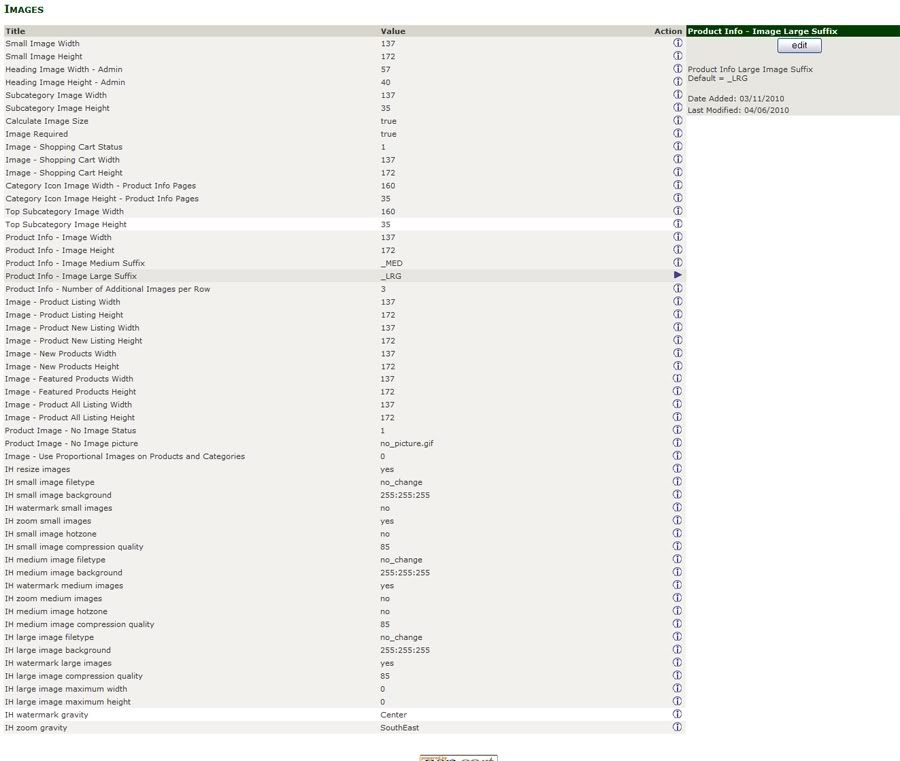
For now I made a screen shot of my settings in the config>images section.

7 Apr 2010, 12:22 AM
#4895
fishingshopjapan avatar

fishingshopjapan

New Zenner

Join Date:
Apr 2010
Posts:
5
Plugin Contributions:
0

Re: Image Handler 2 (for ZC v1.3.8 ONLY) Support

I added the files again but no change. But I think the problem is with the files and my originals perhaps? When I was using my FTP Filezilla it was asking if I want to do overwrites on these files:

main_product_image.php
additional_images.php

I then uninstalled the this contrib and found my images were still text. I have the original files and reinstalled those two files in the the includes>modules folders...all is well. So the good thing is I have isolated the problem. But I'm not a coder:wacko:

7 Apr 2010, 3:20 AM
#4896
nyderrn avatar

nyderrn

New Zenner

Join Date:
Jun 2007
Posts:
9
Plugin Contributions:
0

Re: Image Handler 2 (for ZC v1.3.8 ONLY) Support

I recently installed IH2 and it works perfectly except for the product listing page. The hover image shows up, but when I scroll down the page the image no longer follows the picture. It works on the first 8 or 9 product images, but after that the hover image will not move down the screen and eventually scrolls of the top of the screen the further you go down the page. I found a few threads that had suggestions, but still having this problem.

Thanks for your response,

Tim

7 Apr 2010, 4:18 AM
#4897
nyderrn avatar

nyderrn

New Zenner

Join Date:
Jun 2007
Posts:
9
Plugin Contributions:
0

Re: Image Handler 2 (for ZC v1.3.8 ONLY) Support

Just had a thought. I have my product listing set to 30 products per page. Is there a setting in the style_imagehover.css that I could alter to accommodate the increased page size or should that even matter?

Thanks

Tim

8 Apr 2010, 12:21 AM
#4898
fishingshopjapan avatar

fishingshopjapan

New Zenner

Join Date:
Apr 2010
Posts:
5
Plugin Contributions:
0

Re: Image Handler 2 (for ZC v1.3.8 ONLY) Support

So I guess I'm SOL on getting this to work?

Guess I'll have to hire a coder to see what's going on...Was hoping it would work out of the box but guess it can't...

8 Apr 2010, 1:27 AM
#4899
darkangel avatar

darkangel

Totally Zenned

Join Date:
Oct 2007
Location:
Emporia, Kansas
Posts:
1,729
Plugin Contributions:
0

Re: Image Handler 2 (for ZC v1.3.8 ONLY) Support

FishingshopJapan:

So I guess I'm SOL on getting this to work?

Guess I'll have to hire a coder to see what's going on...Was hoping it would work out of the box but guess it can't...

well since you just posted this and everyone around here are at different times and volunteers, don't you think it is a bit hasty to think you can not be helped?

patience dear one is the best thing to be. read your pm's.

8 Apr 2010, 1:51 AM
#4900
divavocals avatar

divavocals

Totally Zenned

Join Date:
Jan 2007
Location:
Los Angeles, California, United States
Posts:
10,011
Plugin Contributions:
3

Re: Image Handler 2 (for ZC v1.3.8 ONLY) Support

DarkAngel:

well since you just posted this and everyone around here are at different times and volunteers, don't you think it is a bit hasty to think you can not be helped?

patience dear one is the best thing to be. read your pm's.nods in agreement and let me add this.. Perhaps no one answered because none of the VOLUNTEERS who hang here know the answer to your question or have time at the current moment to investigate ON THEIR OWN TIME what your issue might be.. If time is of the essence, and your budget allows, you could have a developer help, or give it a little time and see if one of the VOLUNTEERS here has a solution.. :smile: I unfortunately do not know the answer, but am sure that the answer lies in the javascript that drives the hover..

ETA: A link to your site is also extremely helpful, and may be part of the reason why no one has responded..