Zen Cart Logo
Forums / Addon Templates / Cherry Zen Template Support Thread

Cherry Zen Template Support Thread

Views: 844,718

Results 1,761 to 1,780 of 3,245
27 Jul 2008, 02:17
#1761
signs avatar

signs

Zen Follower

Join Date:
Jun 2006
Posts:
128
Plugin Contributions:
0

Cherry Zen Template Support Thread

That fixed it, thanks! Might want to upload a corrected version maybe...so other folks don't waste a weekend thinking they did something wrong and pull nearly all their hair out. :blush::shocking::D

So glad to have such a simple fix tho. Thanks! :clap:

27 Jul 2008, 11:56
#1762
misskafra avatar

misskafra

New Zenner

Join Date:
Jun 2008
Posts:
5
Plugin Contributions:
0

Re: Cherry Zen Template Support Thread

Hi!

I've just installed the cherry templates, thank you for this beautiful template!
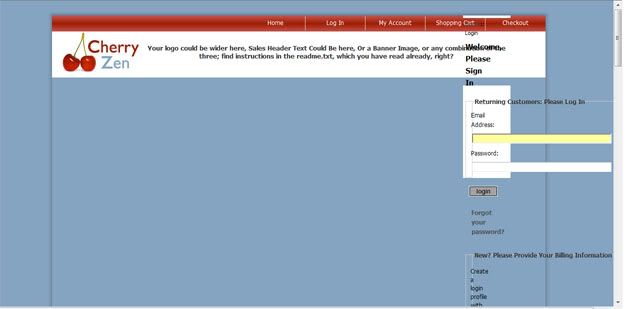
Any other pages looks great but not the login page. It just looks like this:
What have I done wrong?

Please help!!! :(

27 Jul 2008, 16:17
#1763
jettrue avatar

jettrue

Totally Zenned

Join Date:
Jan 2005
Location:
USA, St. Louis
Posts:
3,651
Plugin Contributions:
5

Re: Cherry Zen Template Support Thread

MissKafra:

Hi!

I've just installed the cherry templates, thank you for this beautiful template!
Any other pages looks great but not the login page. It just looks like this:
What have I done wrong?

Please help!!! :(

Look three posts up. :bigups:

This has been fixed in the latest version which is just awaiting approval in the downloads section.

27 Jul 2008, 16:38
#1764
misskafra avatar

misskafra

New Zenner

Join Date:
Jun 2008
Posts:
5
Plugin Contributions:
0

Re: Cherry Zen Template Support Thread

jettrue:

Look three posts up. :bigups:

This has been fixed in the latest version which is just awaiting approval in the downloads section.

Thank you so much for your help and a fast reply!!! :hug:
The problem is fixed :clap:

I apologize for not going through all of the post before submitting my question, I began searching from the first page and then gave up :lamo:

Thanks again!!

28 Jul 2008, 11:34
#1765
thetankgirl avatar

thetankgirl

New Zenner

Join Date:
Jul 2005
Posts:
33
Plugin Contributions:
0

Re: Cherry Zen Template Support Thread

Hi,
Thank you for making it so much easier to give my zen-cart shop a different and nice look!

I don't know if it has been asked already, I've read about 14 pages and searched for the word header those pages:

Is it possible to have the menu (Home-Login etc.) underneath the logo?
I've tried it, but I'm still learning the basics of PHP, and my version didn't look nice lol.
How do I get the menu underneath the logo?

Thanks in advance!!

28 Jul 2008, 17:42
#1766
musicfreer avatar

musicfreer

Zen Follower

Join Date:
Jul 2008
Posts:
155
Plugin Contributions:
0

Re: Cherry Zen Template Support Thread

Hi, the search box of the right column sidebox is aligned to the right, how to make it center?

thanks

28 Jul 2008, 21:22
#1767
susb8383 avatar

susb8383

Zen Follower

Join Date:
Feb 2008
Posts:
129
Plugin Contributions:
0

Re: Cherry Zen Template Support Thread

jettrue:

Of course changing #indexHomeBody to the page ID of the shopping cart page (#shoppingcartBody)

Hi,

How exactly do you find the page ID of a page?

Thanks.

28 Jul 2008, 22:12
#1768
jettrue avatar

jettrue

Totally Zenned

Join Date:
Jan 2005
Location:
USA, St. Louis
Posts:
3,651
Plugin Contributions:
5

Re: Cherry Zen Template Support Thread

susb8383:

Hi,

How exactly do you find the page ID of a page?

Thanks.

In your browser, click "view" then "page source", then look for the body tag of the page (from the home page):

<body id="indexHomeBody">

Every page in zen cart has its own id.

28 Jul 2008, 22:17
#1769
jettrue avatar

jettrue

Totally Zenned

Join Date:
Jan 2005
Location:
USA, St. Louis
Posts:
3,651
Plugin Contributions:
5

Re: Cherry Zen Template Support Thread

thetankgirl:

Hi,
Thank you for making it so much easier to give my zen-cart shop a different and nice look!

I don't know if it has been asked already, I've read about 14 pages and searched for the word header those pages:

Is it possible to have the menu (Home-Login etc.) underneath the logo?
I've tried it, but I'm still learning the basics of PHP, and my version didn't look nice lol.
How do I get the menu underneath the logo?

Thanks in advance!!

Sure, move the chunk starting with <!--bof navigation display--> through <!--eof navigation display--> then paste it after <!--eof branding display-->. If you are displaying the categories under the logo, you can paste it after <!--eof-optional categories tabs navigation display-->

28 Jul 2008, 22:42
#1770
jettrue avatar

jettrue

Totally Zenned

Join Date:
Jan 2005
Location:
USA, St. Louis
Posts:
3,651
Plugin Contributions:
5

Re: Cherry Zen Template Support Thread

musicfreer:

Hi, the search box of the right column sidebox is aligned to the right, how to make it center?

thanks

You're right!

in stylesheet.css, add margin-left:0px; to input.search

29 Jul 2008, 03:42
#1771
theohiobloke avatar

theohiobloke

New Zenner

Join Date:
May 2005
Posts:
6
Plugin Contributions:
0

Re: Cherry Zen Template Support Thread

I have looked for "missing Sideboxes" and "no sideboxes" but have not found the answer to my question.

I have installed the latest version of cherry zen on a production site. When I switch the theme to cherry_zen, I see no sideboxes at all. I have tried with other themes and they seem to show up fine. I have made no changes to css yet.

Just wondering if there is something obvious that I could have missed. The sideboxes show up as grey columns with no content.

tia

John

29 Jul 2008, 06:15
#1772
musicfreer avatar

musicfreer

Zen Follower

Join Date:
Jul 2008
Posts:
155
Plugin Contributions:
0

Re: Cherry Zen Template Support Thread

jettrue:

You're right!

in stylesheet.css, add margin-left:0px; to input.search

thank you so much, I set it to -1px to be more centered

another question, how can I bold the headings of the sideboxes? like important links, documents, new products, etc?

I looked thru the css and thought I should add codes to "h3.leftBoxHeading, h3.rightBoxHeading " as I changed the font color there also

However, I tried to add 'font-weight:bold" but nothing happened

Thanks!

29 Jul 2008, 07:39
#1773
thetankgirl avatar

thetankgirl

New Zenner

Join Date:
Jul 2005
Posts:
33
Plugin Contributions:
0

Re: Cherry Zen Template Support Thread

jettrue:

Sure, move the chunk starting with <!--bof navigation display--> through <!--eof navigation display--> then paste it after <!--eof branding display-->. If you are displaying the categories under the logo, you can paste it after <!--eof-optional categories tabs navigation display-->

Perfect, thank you!

29 Jul 2008, 09:55
#1774
jettrue avatar

jettrue

Totally Zenned

Join Date:
Jan 2005
Location:
USA, St. Louis
Posts:
3,651
Plugin Contributions:
5

Re: Cherry Zen Template Support Thread

theohiobloke:

I have looked for "missing Sideboxes" and "no sideboxes" but have not found the answer to my question.

I have installed the latest version of cherry zen on a production site. When I switch the theme to cherry_zen, I see no sideboxes at all. I have tried with other themes and they seem to show up fine. I have made no changes to css yet.

Just wondering if there is something obvious that I could have missed. The sideboxes show up as grey columns with no content.

tia

John

When you switch to a new custom template for the very first time, you have to add them back manually. Then if you switch away from it and back, they will still be there.

29 Jul 2008, 09:57
#1775
jettrue avatar

jettrue

Totally Zenned

Join Date:
Jan 2005
Location:
USA, St. Louis
Posts:
3,651
Plugin Contributions:
5

Re: Cherry Zen Template Support Thread

musicfreer:

thank you so much, I set it to -1px to be more centered

another question, how can I bold the headings of the sideboxes? like important links, documents, new products, etc?

I looked thru the css and thought I should add codes to "h3.leftBoxHeading, h3.rightBoxHeading " as I changed the font color there also

However, I tried to add 'font-weight:bold" but nothing happened

Thanks!
Because in one section of the stylesheet, there is a font-weight normal for h3.leftBoxHeading, h2.rightBoxHeading. Find that portion, and change it there. :cool:

29 Jul 2008, 10:57
#1776
theohiobloke avatar

theohiobloke

New Zenner

Join Date:
May 2005
Posts:
6
Plugin Contributions:
0

Re: Cherry Zen Template Support Thread

Jade,

Thanks so much! I did not know that. It seemed odd but of course those other themes I must have tried at one point and that is why they have sideboxes.

regards

John

29 Jul 2008, 17:14
#1777
musicfreer avatar

musicfreer

Zen Follower

Join Date:
Jul 2008
Posts:
155
Plugin Contributions:
0

Re: Cherry Zen Template Support Thread

jettrue:

Because in one section of the stylesheet, there is a font-weight normal for h3.leftBoxHeading, h2.rightBoxHeading. Find that portion, and change it there. :cool:

cool, it works perfectly now!~

thanks!

30 Jul 2008, 00:24
#1778
musicfreer avatar

musicfreer

Zen Follower

Join Date:
Jul 2008
Posts:
155
Plugin Contributions:
0

Re: Cherry Zen Template Support Thread

I have 1 more question about modifying product info page, I would like to include youtube videos for some of my products, I knew I can add the embed codes in the product description. However, this may create problem in the future if I want to change template or watever. I think the best way is to make another box under product description, so that the demo video is standalone. Would you brief me how I can achieve that? For eg, which file I should alter so that I can have a standalone area for video? I also consider how I can input the video thru the admin page

I knew this question is not related to this template, but I would appreciate any help that you may offer.

thanks a lot in advance!

PS: the following is a sample though it is actually built with oscommerce
http://www.lannathaicrafts.com/teak-raised-spirit-house-p-62.html?osCsid=f98173352033961a7d7bcc845623d989

30 Jul 2008, 01:34
#1779
jettrue avatar

jettrue

Totally Zenned

Join Date:
Jan 2005
Location:
USA, St. Louis
Posts:
3,651
Plugin Contributions:
5

Re: Cherry Zen Template Support Thread

musicfreer:

I have 1 more question about modifying product info page, I would like to include youtube videos for some of my products, I knew I can add the embed codes in the product description. However, this may create problem in the future if I want to change template or watever. I think the best way is to make another box under product description, so that the demo video is standalone. Would you brief me how I can achieve that? For eg, which file I should alter so that I can have a standalone area for video? I also consider how I can input the video thru the admin page

I knew this question is not related to this template, but I would appreciate any help that you may offer.

thanks a lot in advance!

PS: the following is a sample though it is actually built with oscommerce
http://www.lannathaicrafts.com/teak-raised-spirit-house-p-62.html?osCsid=f98173352033961a7d7bcc845623d989
The best way would be to enter the code for each product, in the item description, in the admin. If you're talking about creating a whole new text area box for your admin, that involves creating a new database entry, and a whole lot more work.

30 Jul 2008, 02:03
#1780
musicfreer avatar

musicfreer

Zen Follower

Join Date:
Jul 2008
Posts:
155
Plugin Contributions:
0

Re: Cherry Zen Template Support Thread

jettrue:

The best way would be to enter the code for each product, in the item description, in the admin. If you're talking about creating a whole new text area box for your admin, that involves creating a new database entry, and a whole lot more work.

yeah, I understand

but if I entered the code in the product description, when I want to change the layout in the future, say, moving the description from the bottom to the right of the main image, there maynot be enough space for the movie and the layout may break

adding an extra box will involve change in database? then it maybe too complicated for me, who never touch php and database b4

Thanks again and do let me know if you have better suggestion :smile: