Zen Cart Logo
Forums / Addon Templates / Cherry Zen Template Support Thread

Cherry Zen Template Support Thread

Views: 844,718

Results 1,781 to 1,800 of 3,245
30 Jul 2008, 10:11
#1781
xerxas avatar

xerxas

New Zenner

Join Date:
Jul 2008
Posts:
4
Plugin Contributions:
0

Cherry Zen Template Support Thread

Hi, I am new to all these. Recently, i set up my store and everything was working fine until i found out that my log in page is a bit messed up. the main content are all located at the right column instead of the centre. may i know how do i rectify this problem?
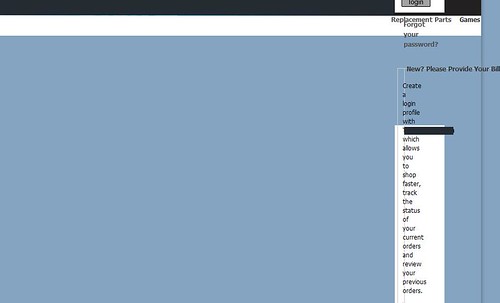
this is the screenshot.

any help will be greatly appreciated. thanks.

30 Jul 2008, 19:13
#1782
musicfreer avatar

musicfreer

Zen Follower

Join Date:
Jul 2008
Posts:
155
Plugin Contributions:
0

Re: Cherry Zen Template Support Thread

Xerxas:

Hi, I am new to all these. Recently, i set up my store and everything was working fine until i found out that my log in page is a bit messed up. the main content are all located at the right column instead of the centre. may i know how do i rectify this problem?

this is the screenshot.

any help will be greatly appreciated. thanks.

if you search the keyword 'login' in this thread, you will find the solution
it is in p.177

cheers

30 Jul 2008, 23:06
#1783
confused_aswell avatar

confused_aswell

Zen Follower

Join Date:
Apr 2008
Location:
UK
Posts:
315
Plugin Contributions:
1

Re: Cherry Zen Template Support Thread

Hi

I have just re-installed zen cart, copied the cherry zen includes file to my server, changed the template in admin but all I am getting is a blank blue page, any suggestions please. It is quite urgent I get this sorted as soon as poss as I have to get on with configuring the rest of the store.

thanks for a quick reply, I will be waiting.

Phil

30 Jul 2008, 23:32
#1784
jettrue avatar

jettrue

Totally Zenned

Join Date:
Jan 2005
Location:
USA, St. Louis
Posts:
3,651
Plugin Contributions:
5

Re: Cherry Zen Template Support Thread

confused_aswell:

Hi

I have just re-installed zen cart, copied the cherry zen includes file to my server, changed the template in admin but all I am getting is a blank blue page, any suggestions please. It is quite urgent I get this sorted as soon as poss as I have to get on with configuring the rest of the store.

thanks for a quick reply, I will be waiting.

Phil

I don't have a simple answer for you. Chances are you didn't upload everything correctly. :wacko: Once suggestion is to check your error log to see if it gives you any clues as to what might be wrong/missing.

31 Jul 2008, 00:01
#1785
confused_aswell avatar

confused_aswell

Zen Follower

Join Date:
Apr 2008
Location:
UK
Posts:
315
Plugin Contributions:
1

Re: Cherry Zen Template Support Thread

Hi

I am using zen 1.38

So, I have uploaded the includes folder to the server and this is what I have -

Shopping >Includes > Languages > Cherry_Zen > english.php, Classic, English > Cherry_Zen >Header.php

then in Templates I have > Cherry_Zen, Classic, Template_default

That's pretty much it, I just can't work it out Jettrue!

Will try redoing it,

Thanks for the quick reply,

Phil

PS I am not sure where my error log is!!!!

31 Jul 2008, 05:15
#1786
xerxas avatar

xerxas

New Zenner

Join Date:
Jul 2008
Posts:
4
Plugin Contributions:
0

Re: Cherry Zen Template Support Thread

hi musicfreer, i have checked p177 but i think my problem is a little bit different. this problem is unique only to my login page. my other pages are working fine. im sorry if this have already been discussed before, but i simply cannot find the solution. also, im alien to most of terms used here.i will be really grateful to you if you can help me out with this.

thank you

31 Jul 2008, 08:58
#1787
ilonka avatar

ilonka

New Zenner

Join Date:
Nov 2005
Posts:
51
Plugin Contributions:
0

Re: Cherry Zen Template Support Thread

treewoman:

Thank you for your help. That was the problem. The bigger problem is that I have over 8000 products affected by this. Changing each one would be an absolute nightmare. I guess I'll have to see if there is another way to fix this.

Does somebody has an asnwer for this. I am adding my products as well. Andhaving over 1500 to add. But at the moment i have to turn on the Yes, Show Quantity Box by hand. This is takign to much time. In the previous version of zen-cart this was automatically set to yes.

Can somebody help me out??

31 Jul 2008, 10:03
#1788
jettrue avatar

jettrue

Totally Zenned

Join Date:
Jan 2005
Location:
USA, St. Louis
Posts:
3,651
Plugin Contributions:
5

Re: Cherry Zen Template Support Thread

Xerxas:

hi musicfreer, i have checked p177 but i think my problem is a little bit different. this problem is unique only to my login page. my other pages are working fine. im sorry if this have already been discussed before, but i simply cannot find the solution. also, im alien to most of terms used here.i will be really grateful to you if you can help me out with this.

thank you

Open up includes/templates/cherry_zen/css/stylesheet.css, and remove the chunk at the bottom of the page starting with #loginBody

31 Jul 2008, 10:04
#1789
jettrue avatar

jettrue

Totally Zenned

Join Date:
Jan 2005
Location:
USA, St. Louis
Posts:
3,651
Plugin Contributions:
5

Re: Cherry Zen Template Support Thread

ilonka:

Does somebody has an asnwer for this. I am adding my products as well. Andhaving over 1500 to add. But at the moment i have to turn on the Yes, Show Quantity Box by hand. This is takign to much time. In the previous version of zen-cart this was automatically set to yes.

Can somebody help me out??

I would ask this in the general forum, has nothing to do with the template.

31 Jul 2008, 10:06
#1790
jettrue avatar

jettrue

Totally Zenned

Join Date:
Jan 2005
Location:
USA, St. Louis
Posts:
3,651
Plugin Contributions:
5

Re: Cherry Zen Template Support Thread

confused_aswell:

Hi

I am using zen 1.38

So, I have uploaded the includes folder to the server and this is what I have -

Shopping >Includes > Languages > Cherry_Zen > english.php, Classic, English > Cherry_Zen >Header.php

then in Templates I have > Cherry_Zen, Classic, Template_default

That's pretty much it, I just can't work it out Jettrue!

Will try redoing it,

Thanks for the quick reply,

Phil

PS I am not sure where my error log is!!!!
There's a lot more files that that, every single file in the includes folder for this template need to be uploaded.

The error_log is commonly found in the root of your site.

31 Jul 2008, 13:28
#1791
jmcgov avatar

jmcgov

New Zenner

Join Date:
Oct 2007
Posts:
31
Plugin Contributions:
0

Re: Cherry Zen Template Support Thread

Hello,
I'm having 2 separate issues I'm hoping someone can help with either or both.

On the search box in the left nav column; the term search is not centered in the box. How do I fix this? I've checked in the template and can't find where to center it.

In the pop up boxes; I am using a dark image background, when a pop up box is triggered, it has the dark image background and dark text. Almost impossible to read. How can I override this and just have a plain white background or change the text in the pop up boxes to white. Either way as long it legible...... This is happening with all of the pop up boxes so it is a sitewide setting.

The link to the site is
http://pipersparlor.com/index.php?main_page=advanced_search

That goes to the advanced search page, notice the search issue on left nav column, top box in column... and for the pop up issue trigger the search help box.

Thank you,
Jim

[WARNING] This is a lingerie site. nothing you won't see in Victoria's or Fredrick's. That way there are no surprises

31 Jul 2008, 13:52
#1792
xerxas avatar

xerxas

New Zenner

Join Date:
Jul 2008
Posts:
4
Plugin Contributions:
0

Re: Cherry Zen Template Support Thread

jettrue:

Open up includes/templates/cherry_zen/css/stylesheet.css, and remove the chunk at the bottom of the page starting with #loginBody

thanks for the prompt reply, but i dont seem to have any chunk of code starting with #loginBody in my stylesheet.css =(

31 Jul 2008, 21:37
#1793
jettrue avatar

jettrue

Totally Zenned

Join Date:
Jan 2005
Location:
USA, St. Louis
Posts:
3,651
Plugin Contributions:
5

Re: Cherry Zen Template Support Thread

Xerxas:

thanks for the prompt reply, but i dont seem to have any chunk of code starting with #loginBody in my stylesheet.css =(

Check again, its probably there, or you wouldn't be having this issue. This is the code that needs to be removed:

#loginBody #navColumnOne, #loginBody #navColumnTwo {
display:none;
}
#loginBody .contentWrap {
background:#fff;
clear:both;
}
#loginBody .outer {
padding:0!important;
}
#loginBody .float-wrap {
width:90%
}

if you still don't see that, **please **post a link to your site.

31 Jul 2008, 21:44
#1794
jettrue avatar

jettrue

Totally Zenned

Join Date:
Jan 2005
Location:
USA, St. Louis
Posts:
3,651
Plugin Contributions:
5

Re: Cherry Zen Template Support Thread

JMcGov:

[COLOR="Black"]Hello,
I'm having 2 separate issues I'm hoping someone can help with either or both.

On the search box in the left nav column; the term search is not centered in the box. How do I fix this? I've checked in the template and can't find where to center it.

In the pop up boxes; I am using a dark image background, when a pop up box is triggered, it has the dark image background and dark text. Almost impossible to read. How can I override this and just have a plain white background or change the text in the pop up boxes to white. Either way as long it legible...... This is happening with all of the pop up boxes so it is a sitewide setting.

Thank you,
Jim

  1. in stylesheet.css, add margin-left:0px; to input.search

  2. Add this to your stylesheet.css:

#popupShippingEstimator, #popupSearchHelp, #popupAdditionalImage, #popupImage, #popupCVVHelp, #popupCouponHelp, #popupAtrribsQuantityPricesHelp, #infoShoppingCart {
background-color: #ffffff;
}

01 Aug 2008, 03:01
#1795
jmcgov avatar

jmcgov

New Zenner

Join Date:
Oct 2007
Posts:
31
Plugin Contributions:
0

Re: Cherry Zen Template Support Thread

jettrue:

  1. in stylesheet.css, add margin-left:0px; to input.search

  2. Add this to your stylesheet.css:

#popupShippingEstimator, #popupSearchHelp, #popupAdditionalImage, #popupImage, #popupCVVHelp, #popupCouponHelp, #popupAtrribsQuantityPricesHelp, #infoShoppingCart {
background-color: #ffffff;
}

Thank you jettrue,
That took care of the popups, actually it didn't need the words "-color". I got rid of that and worked perfectly. :clap:

However.... lol On the first part, I don't think I explained myself well... it's not the actual search input field I want to center. It's the header for the search box. The word "search" is on the left of the header for the box while all the other boxes have the header centered.

Sorry for any confusion.
Thank you,
Jim

http://pipersparlor.com/index.php?main_page=advanced_search

[Standard Disclaimer] This is a lingerie site. Just like Victoria's or Frederick's. But fair warning.

01 Aug 2008, 03:49
#1796
jettrue avatar

jettrue

Totally Zenned

Join Date:
Jan 2005
Location:
USA, St. Louis
Posts:
3,651
Plugin Contributions:
5

Re: Cherry Zen Template Support Thread

JMcGov:

[COLOR="Black"]Thank you jettrue,
That took care of the popups, actually it didn't need the words "-color". I got rid of that and worked perfectly. :clap:

However.... lol On the first part, I don't think I explained myself well... it's not the actual search input field I want to center. It's the header for the search box. The word "search" is on the left of the header for the box while all the other boxes have the header centered.
That's not standard in the template, this chunk of code you added is causing it:

/* centers text in subscribe box */
#subscribeContent .sideBoxContent centeredContent, label {
float: left;
}

01 Aug 2008, 04:12
#1797
bx1 avatar

bx1

New Zenner

Join Date:
Aug 2007
Location:
Australia
Posts:
67
Plugin Contributions:
0

Re: Cherry Zen Template Support Thread

Hi Jade,

Great template! I have a quick question.....how do you get the sideboxes to display only on the right side? I have them displaying there at 200px but when you visit a product, all the sideboxes move to the left and overlap all of my text, in fact all the text goes to the sidebox width...very strange.

Sorry if this has already been answered in a previous post but I had a look and couldn't find any answers.

Thanks for your help!

01 Aug 2008, 12:58
#1798
jettrue avatar

jettrue

Totally Zenned

Join Date:
Jan 2005
Location:
USA, St. Louis
Posts:
3,651
Plugin Contributions:
5

Re: Cherry Zen Template Support Thread

bx1:

Hi Jade,

Great template! I have a quick question.....how do you get the sideboxes to display only on the right side? I have them displaying there at 200px but when you visit a product, all the sideboxes move to the left and overlap all of my text, in fact all the text goes to the sidebox width...very strange.

Sorry if this has already been answered in a previous post but I had a look and couldn't find any answers.

Thanks for your help!
Could I see a link please?

01 Aug 2008, 19:21
#1799
susb8383 avatar

susb8383

Zen Follower

Join Date:
Feb 2008
Posts:
129
Plugin Contributions:
0

Re: Cherry Zen Template Support Thread

Hi,

I changed the button colors in a quick and dirty way that I thought I'd share.

  1. Open tabrightE.gif of the original color in Photoshop.

  2. Change the color mode to RGB (image/mode/RGB color).

  3. Create a new layer above tabrightE. Select a rectangle half the width of tabrightE but just as high, and fill it with the color you're trying to match. You should see the rectangle of color sitting on top of tabrightE.

  4. Create an adjustment layer between your new layer and tabrightE. It should be a hue/saturation layer.

  5. Now just tweak the slider bars on the adjustment layer until tabrightE visually looks as close to your rectangle of color as you can get it. I focused mainly on the top half of tabrightE.

Once this looks close enough, hide the rectangle layer (or delete it), open all the other images for the original color and just drag the adjustment layer into each. All of the images will now look the same.

I know that making it so that it visually matches isn't an exact science, but since the buttons have a gradient anyway, it should be good enough.

Make sure you save the images under a new directory for your color.

02 Aug 2008, 01:12
#1800
bx1 avatar

bx1

New Zenner

Join Date:
Aug 2007
Location:
Australia
Posts:
67
Plugin Contributions:
0

Re: Cherry Zen Template Support Thread

jettrue:

Could I see a link please?

Hi Jade,

The site is on my computer so I have included an image of the product page. Hopefully this is enough. Thanks for your reply!